How to Automate HomeKit When You Arrive or Leave, Using Your Mac
Use your Mac as a smart home hub: build arrive and leave rules with WiFi presence or geofence triggers, run HomeKit scenes and send webhooks to Home Assistant with Pulse Home.
"Lights on when I get home, everything off when I leave" is the automation most people want first. Apple's Home app can do location-based automations, but they depend on a home hub and your phone's location. If a Mac is usually on at home, it can run these rules itself. Pulse Home turns a Mac into that automation hub.
1. Decide what counts as arriving and leaving
Pulse Home offers two kinds of presence trigger. WiFi presence watches signal patterns to tell whether someone is in the room, and it uses the calibration from Pulse Guard. Geofence triggers fire when you enter or leave a zone you define. Use geofence for "leaving home" routines and WiFi presence for "someone is in the room" rules.
2. Build the arrive rule
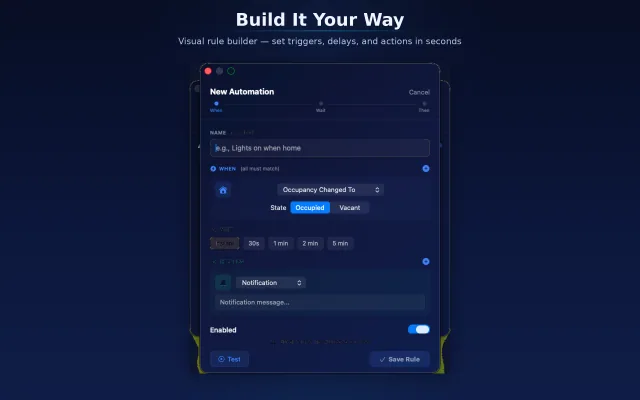
Open the rule builder from the menu bar and create a rule with your arrival trigger. Add a condition if needed, for example only after sunset, and an action that controls HomeKit devices such as lights. Rules run locally on your Mac.
3. Build the leave rule with a delay
For leaving, add a short delay before turning things off, so a quick trip to the car does not switch off the whole house. Chain the actions you need: lights off, a lock, a notification.
4. Connect devices outside HomeKit
Not every device works with HomeKit. Pulse Home can send webhooks, HTTP requests, to Home Assistant, Node-RED, IFTTT or any endpoint you control. Use a webhook action in the same rule to reach those devices.
5. Test and adjust
Walk out and back in a few times and watch the rule status in the menu bar. If a rule fires too eagerly, lengthen the delay or add a condition. The free version lets you start with basic rules; Pro unlocks unlimited rules, webhooks and geofence triggers.
Things to know
- Your Mac must be on and awake for rules to run.
- WiFi presence depends on a good calibration; recalibrate if you move furniture or the Mac.
- Pulse Companion on iPhone lets you check status and switch modes when you are away.
Frequently asked questions
Why is my HomeKit automation not working when I leave home?
Location automations in the Home app need a home hub and location access for the Home app on the person's iPhone. Check both, and that the person is set up in the home. Pulse Home avoids the phone dependency by running rules on a Mac that stays at home.
Can I use a Mac as a HomeKit hub?
Not as an official Apple home hub; that role is limited to Apple TV and HomePod. A Mac can still control HomeKit accessories and run your own automation rules with an app like Pulse Home, as long as it stays on and awake.
Can Home Assistant receive webhooks from a Mac?
Yes. Home Assistant automations can be triggered by a webhook, and Pulse Home can send an HTTP request to that webhook URL as an action in a rule.